Builder Stacks Hub (10 Guides)
WP_MEMORY_LIMIT vs WP_MAX_MEMORY_LIMIT vs php.ini memory_limit
WordPress caps frontend PHP memory at WP_MEMORY_LIMIT (40M default) unless explicitly raised inside wp-config.php below php.ini.
Frontend 512M | Admin/Editor 512-768M
Why Setting php.ini Alone Fails in WordPress
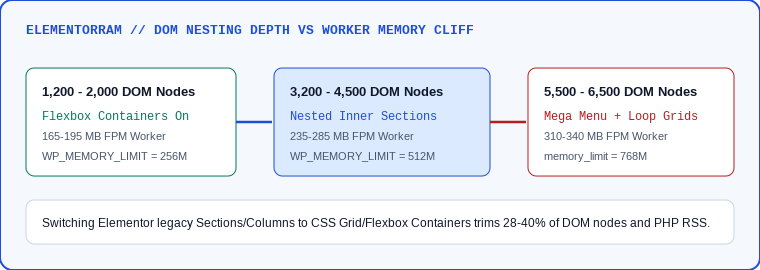
Even when your host sets php.ini memory_limit = 512M, WordPress defaults WP_MEMORY_LIMIT to 40M (64M multisite) for frontend requests and 256M for wp-admin. Elementor templates loaded on the frontend will exhaust memory early unless WP_MEMORY_LIMIT is pinned in wp-config.php.
Correct Hierarchy Inside wp-config.php
Keep WP_MEMORY_LIMIT <= WP_MAX_MEMORY_LIMIT <= php.ini memory_limit. For Elementor Pro + WooCommerce, configure WP_MEMORY_LIMIT to 512M, WP_MAX_MEMORY_LIMIT to 512M or 768M, and match php.ini memory_limit above WP_MAX_MEMORY_LIMIT.
Measured Thresholds & Configuration
| Constant / Directive | WordPress Default | Elementor Pro Target | Scope |
|---|---|---|---|
| WP_MEMORY_LIMIT | 40M | 512M | Frontend + AJAX |
| WP_MAX_MEMORY_LIMIT | 256M | 512M - 768M | wp-admin + Editor |
| php.ini memory_limit | 128M / 256M | 512M - 768M | Hard PHP-FPM Cap |